
Your rankings in Google decide how many customers find you. But a ranking on its own doesn't tell you much. You also want to know who ranks above you, whether Google shows a map or an AI answer for that search, and whether you're in it.
That's why we have rebuilt our SEO Visibility tool. It now gives you a much more complete and honest picture of how your business shows up in Google.
Why we rebuilt it
The old SEO Visibility page was built almost entirely on estimates for your whole domain. For large websites those estimates work well. But most of our clients are small and local businesses, and for them the estimates were often based on just a handful of searches. A site found for eight searches would see "Estimated traffic: 12", which says nothing useful and doesn't match what they see in their own analytics.
The new SEO Visibility is built on your own keywords, checked in Google for your market, and on the full Google results page behind each one. Here is what that gives you:
- your real positions and how they change over time
- the competitors that rank above you, keyword by keyword
- whether Google shows a map or an AI Overview for your keywords, and whether you're in it
- an honest message instead of a guess when there is too little data
What's included for free
Every project gets an overview of how its whole domain performs in Google:
- Every keyword your domain ranks for, now with the number of monthly searches for each one in your ranked keywords, so you can see which keywords are worth caring about.
- Close to page one. The keywords where you rank on page two of Google, the most searched first. These are often your quickest wins.
- The competitor ranking above you for the searches you share, with how often you meet and where each of you usually ranks. Websites that rank for everything, like business directories, are filtered out so you see real competitors.
- What Google shows for your keywords. How many of your keywords show a Google Maps box or a Google AI Overview above the normal results.
- Estimated traffic, average position and your pages that bring the most visits, when there is enough data for them to mean something. If Google shows your site for too few searches, we tell you so instead of showing a number that is really a guess.
Don't have an account yet? Create a free account and add your website to see how your domain does in Google.
What's included in the paid plans
With Professional and Agency you track your own keywords (up to 300 on Professional and 1,000 on Agency), and the page is built on our checks of exactly those keywords:
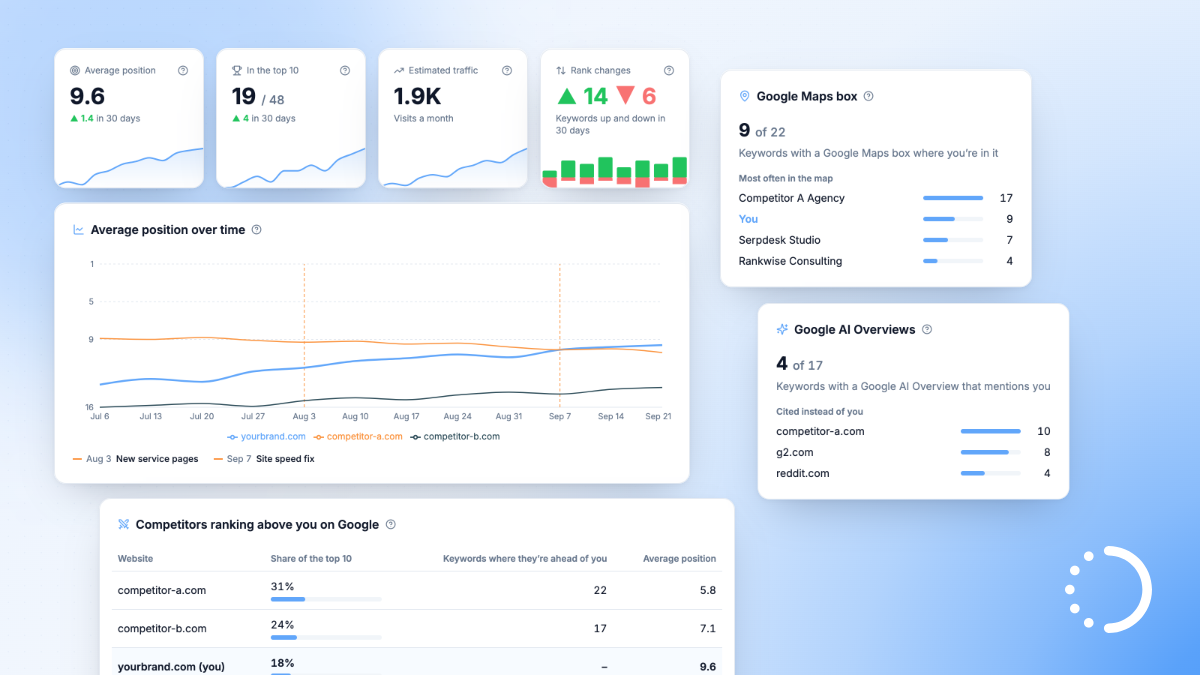
- Your key numbers at a glance from the keyword tracker: average position, how many keywords are in the top 10, estimated monthly visits from your positions, and how many keywords moved up or down. Each with a small chart showing the trend.
- Average position over time, next to the competitors you add, with your own notes on the chart. Mark a site launch, new content or a campaign, and see the ranking changes that followed.
- Ranking distribution and biggest moves. How your keywords spread across Google's result pages, and which keywords moved the most, including the ones that entered or left the results.
- Every competitor above you: their share of the top 10 across your keywords, how many of your keywords they beat you on, and their average position, with your own site in the same list.
- Google Maps box. For local searches Google often shows a map with three businesses above the results. See for how many of your keywords you're in that map, at which place, and which other businesses appear there most often.
- Google AI Overviews. See which of your keywords get an AI Overview, whether it mentions you, and which websites it cites instead of you.
- A closer look at every keyword. Your keyword list now shows estimated visits and marks where you appear in the map or an AI Overview. Click a keyword to see its position history and the latest Google results for it, from position 1 down to you.
All of this also appears in your automated client reports, with the same numbers your clients would see in the dashboard. And if you connect Google Search Console, you also get the clicks and impressions Google actually recorded for your site in the same project.
Compare plans and upgrade to track your own keywords and see who you are up against.
What happens to your existing data?
Nothing is lost. Your tracked keywords, their history and your competitors carry over, and the new widgets use them right away. One number is gone: traffic value, an estimate of what your traffic would cost as Google Ads. For most sites it was more confusing than useful, so we removed it.
Log in to your project and open SEO Visibility to see the new page. As always, reply to this email if you have questions or feedback. We'd love to hear what you think.