
When someone nearby searches for what you sell, Google often shows a map with three businesses above the websites. Being one of those three often decides who gets the call, the visit or the booking.
But there is a catch: where you appear on that map depends on where the customer is standing. You can be first for someone next door and nowhere for someone two kilometres away. A single ranking number can't show you that.
That's why we have built the Local SEO Tracker, a new page in your project next to SEO Visibility and AI Visibility.
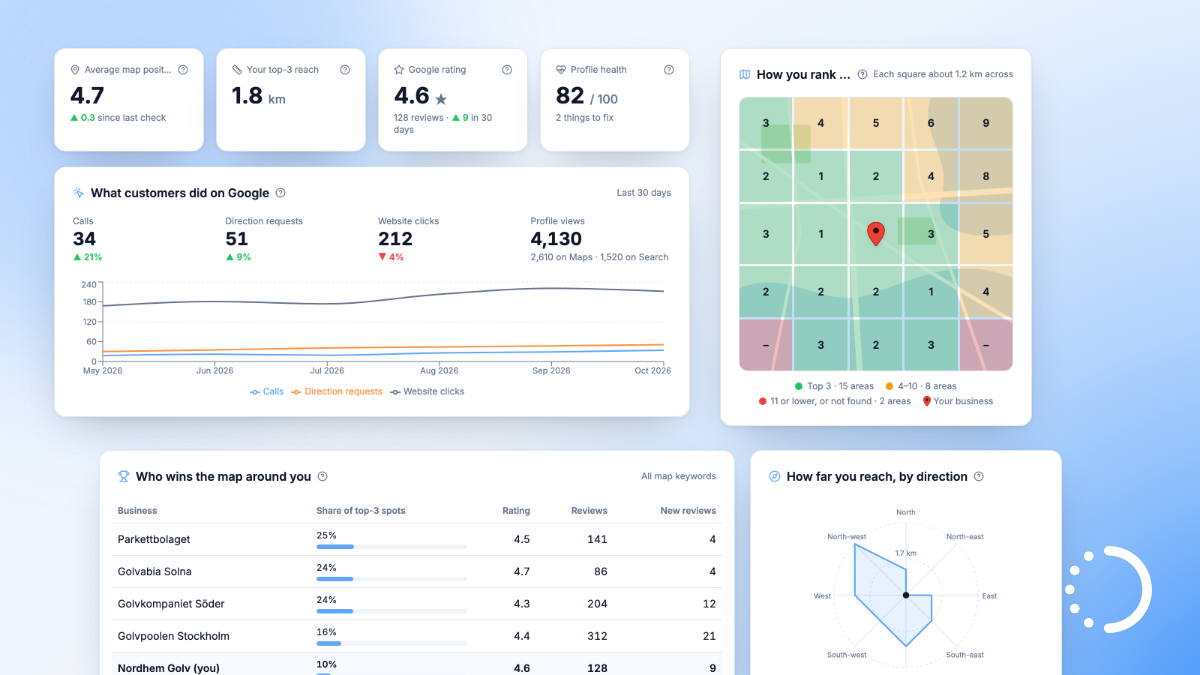
Your position on Google Maps, area by area
We check your Google Maps position from 25 spots in a grid around your business, for every tracked keyword where Google shows a map. You then see:
- How you rank in each area. A real map split into 25 squares, each tinted by your position for a customer standing there: green for the top 3, orange for 4 to 10, red for 11 or lower. Hover a square to see your position and which business comes first there.
- How far your reach goes. How far from your business you stay among the top 3, in each direction, and at what distance customers stop seeing you near the top.
- A summary in plain words, like "Customers within about 2 km of you find you among the top 3. Further out, a competitor comes first to the north and east."
- Who comes first on the map around you. The local businesses that take the most top-3 spots across your keywords, with their Google rating and number of reviews.
- Your progress over time. Your average map position, your top-3 reach and the areas where you're first, compared with earlier checks.
The squares are 1.2 km apart by default, which suits a shop or office in a town. You can change the distance and the centre of the grid yourself. If your Business Profile has no address because you visit your customers, like a plumber or a cleaning company, you simply click the map to choose the centre of the area you serve.
What your Google Business Profile tells you
The Local SEO Tracker uses your Google Business Profile, so you connect it once from the Integrations page in your project and choose your business location. Then you also see:
- What customers did on Google: calls, direction requests, website clicks and how often your profile was viewed on Google Maps and in Google Search, compared with the period before.
- How customers find you: the searches that showed your profile and how often. One click on Track adds a search to your tracked keywords, so we follow your position for it too.
- All your reviews in one place, newest first, with the ones you haven't replied to clearly marked.
- A profile checklist: category, opening hours, website, phone number, description, photos and recent posts. Complete, active profiles tend to do better on Google Maps, and the checklist shows exactly what to add or update.
Who can use it?
The Local SEO Tracker is included in Professional and Agency. It works with the keywords you already track, so it fits within the keyword allowance you already have: up to 300 on Professional and 1,000 on Agency. To get the most out of it, track the keywords your local customers use, for example with your town in them. Not sure which of your keywords show a map? The Google Maps box overview in SEO Visibility tells you.
On the free plan? Compare our plans and try Professional free for 7 days, no credit card needed.
How to get started
Open your project, go to Integrations and connect Google Business Profile. Pick your business location after signing in with Google. Local SEO then appears in your project menu, and your first map check starts right away, or as soon as you have chosen the centre of your area if your profile has no address.
As always, reply to this email if you have questions or feedback. We'd love to hear what you think.